Changelog
WNI Navigation
3.9.8 _ May 14, 2026
- Made minor maintenance updates
ANNOUNCEMENT _ October 01, 2024
- ** Maintenance is scheduled from 06:00 - 07:00 UTC. During this time, certain functionality may be unavailable for up to 10 minutes. We apologize for any inconvenience this may cause. **
3.9.7 _ Jan 07, 2026
- Fixed an issue with AIS update timing
3.9.6 _ July 04, 2024
- Fixed a bug where the Rolling value was not updating
3.9.5 _ June 13, 2024
- Fixed a bug where the AISDepth and RouteDepth layers were not being displayed after a basemap change
- Fixed a bug where the selected route type was being set to OSR even though the route was a Passageplan type
- Made other minor bug fixes
3.9.4 _ June 6, 2024
- Fixed a bug where the Cyclone and Cyclone Probability layers were still displaying dissipated cyclones
- Made minor bug fixes
3.9.3 _ May 23, 2024
- Fixed a bug where the Group and Company Areas were not being displayed on the map
3.9.2 _ April 25, 2024
- Added AIS Depth and Route Depth layers (Passageplan only)
- Updated the Wave layer color scheme
- Made minor bug fixes
3.9.1 _ March 28, 2024
- Added a separate risk level button for Offtrack > 99nm alerts
- Made performance improvements
- Fixed a bug where the applicable area layer was not being displayed on alert click
- Made other minor bug fixes
3.9.0 _ January 25, 2024
- Added Mentions: Now users can tag different users in the comment section by using "@". Users will receive notifications if they are tagged in any comments.
- Added Notification panel: Users can check their notifications in this panel. Notification
3.8.9 _ January 18, 2024
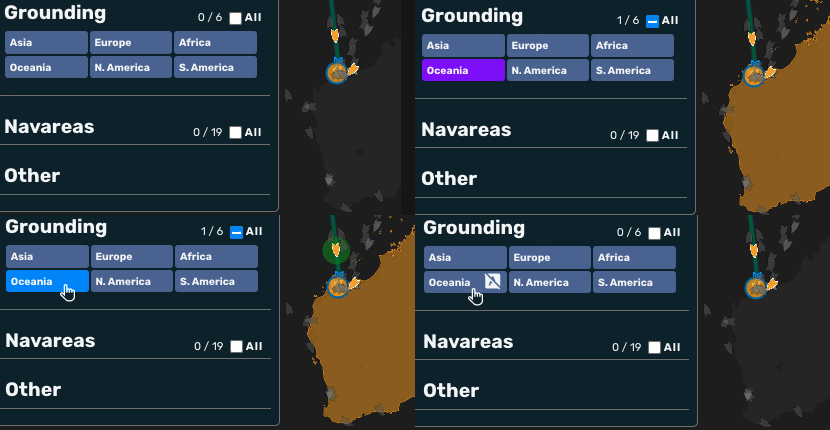
- Added a feature to prevent Grounding layer auto-toggle. (The auto-toggle feature can be disabled by clicked the purple layer button in the Layer Menu)
- Fixed a bug where the simulation point wind barbs were being set when no data was available.
- Set the Time Controller text color to gray so it is easier to see against a white background.
3.8.7 _ December 21, 2023
- Fixed a bug where the map would disappear when the guide page was open
3.8.6 _ December 14, 2023
- Added a Chatbot (beta) to answer questions about WNI Navigation Assessment & Routing (NAR)
- Set the name of the original route in the route editor to be the actual route name instead of "Orig"
- Added stricter validation for the Rolling Rose inputs
- Made minor improvements and bug fixes
3.8.5 _ December 07, 2023
- Added Waypoint weather icons to the simulation routes
- Made UI improvements to the Time Controller
- Added a NOW button, which when clicked, sets the Time Controller to the current time and pans to the current AIS position of the selected vessel
3.8.4 _ November 30, 2023
- Made improvements to the Route Edit Mode
- Moved the route selection button to the edited route tab "..." button. The Route Comparison Table now displays a check icon next to the current route only.
- Moved the edited route "X" (delete) button to the edited route tab "..." button (and changed it from an icon to "Delete")
- Made UI improvements to the Time Controller
- Controls are now located to the left of the slider
- On mobile, the controls are accessible by clicking the "..." button to the left of the slider
3.8.3 _ November 21, 2023
- Made improvements to the Route Edit Mode and Time Slider
- Added RTZ Import and Export functionality
- Added an indicator for the current route
- Added edit duplication functionality
3.8.2 _ October 24, 2023
- Added Damage Risk Graphs
- Moved User Settings inside the Comments tab
- Fixed bugs
3.8.1 _ October 12, 2023
- Enabled full functionality of the Route Edit Mode
- Fixed bugs
3.8.0 _ October 05, 2023
- Added the Route Edit Mode
- Updated the layout to make it more mobile-friendly
- Fixed a bug where the selected user was not being saved
3.7.0 _ September 21, 2023
- Added Risk Communication Function
- Moved Rolling rose to one of the tabs in the side panel of Risk Communication Function.
- Fixed a bug where a vessel selected from the Daily Summary Mail would not be scrolled to in the monitoring list.
3.6.8 _ September 07, 2023
- Added Navtex alerts
3.6.7 _ August 02, 2023
- Added export functionality to the Monitoring List (CSV format)
- Made the Monitoring List more mobile-friendly
- Moved the monitoring list dropdown menus to a single "Filters" dropdown
- Moved column sorting to a dropdown with an ascending / descending button
- Removed side-scrolling, instead moving other items into a sub-row (open by clicking the blue '+')
- Fixed bugs
3.6.6 _ July 20, 2023
- Changed the color of stationary fronts to red & blue (previously pink), and added a pressure label to the H and L icons
3.6.5 _ July 13, 2023
- Updated an e-mail response for when an e-mail has been received in Microsoft Outlook rich text format, asking the user to re-send in plain text format
3.6.4 _ July 06, 2023
- Added Company Area data from before 2022
3.6.3 _ June 29, 2023
- Added AIS status to the vessel tooltip
- Made performance improvements
3.6.2 _ June 08, 2023
- Added a Navtex layer to the Layer Menu "Other" category
- Separated the Monitoring List alert click functionality from the alert type filter
- Made performance enhancements
- Made vessels selectable by clicking the "IMO" or "Name" box in the Monitoring List
- Changed the color of offtrack >99nm alerts from light blue to purple
- Made minor visual improvements and fixed bugs
- The Monitoring List alert sort arrow direction now matches other columns - ^ for ascending
- The Monitoring List Lat/Lon decimal display now properly shows 6 decimal places
3.6.1 _ May 29, 2023
- Fixed a bug where the vessel highlight and tooltip positions were not being updated with the AIS update
- Moved the Nautical Charts to the right-hand basemap layer selection tool
- Added additional user settings to the settings preservation feature
- selected basemap
- Monitoring List (Vessel) Name & IMO search inputs
- Time Controller "by Point" setting and initial display
- Rolling Rose initial setting (rolling risk or weather)
- Risk Level filter settings
- Changed the functionality of the Time Controller "by Point" checkbox
- It is now on by default, and saved in user settings
- When clicking a simulation point, "by Point" is automatically toggled on
- When toggling "by Point" on or off, the nearest simulation point to the current Time Controller time is selected (before the point nearest the current real time was used)
- Fixed a bug where the vessel highlight and tooltip positions were not being updated with the AIS update
- Fixed a bug where the tooltip would not appear when multiple features were underneath the pointer
3.6.0 _ May 22, 2023
- Added 3-minute AIS updates
- Added settings preservation across sessions
- Changed the left-hand (risk level-based) vessel count functionality to reflect highlighted vessels
- Changed Monitoring List PP Status and Route Type filter functionality (If no item is selected, no vessels are displayed)
- Made performance improvements
- Fixed Safari-based Monitoring List bug
- Fixed auto-layer toggle bug
- Fixed a bug where the rolling risk LPP parameter was not being set for OSR routes
- Fixed a bug where some latest OSR routes were not being displayed
3.5.0 _ May 11, 2023
- Added risk name of navarea intersection to the tooltip
3.4.0 _ April 27, 2023
- Updated the Monitoring List IMO, (Vessel) Name, and PP Status filters - they now affect vessel icon highlights
- Fixed several bugs (Monitoring List label toggle-all checkbox functionality bug, tooltip flicker bug)
- Improved the intersection alert tooltip content (added an "Area" property, changed Time To Intersection to be hours from the current time instead of simulation time)
Incident Notification
An incident occurred on April 26, 2023, from 00:15 to 02:54 UTC. The issue has been resolved. We apologize for any inconvenience.
#### [Incident Details]
- It has been confirmed that an issue occurred in the automatic email reply function in cases where the uppercase **"NAR-PP@wni.com"** was included in the CC field instead of **"nar-pp@wni.com,"** resulting in an infinite loop. This issue has now been resolved.
3.3.0 _ April 24, 2023
- Added extra functionality to the tooltip layer select dropdown vessel items - Now the selected map vessel is changed on click
- Added identifying data to the tooltip layer select dropdown items
- Changed the functionality of the Monitoring List All labels checkbox - it now only toggles items displayed in the list
- Added three new layers: Sea Markers (Visible from zoom level 7 and up), ECA, Load Line
- Made minor visual updates
3.2.0 _ April 12, 2023
- Removed unnecessary transitions for Light / Dark mode.
- Added vessel highlights to vessels displayed in the Monitoring List.
- Fixed an issue where clicking on a ship link in the Daily Summary Mail did not automatically scroll to that ship on the Monitoring List.
3.1.0 _ April 6, 2023
- Added an auto-reply function to Passage Plan e-mail
- Added a page Passage Plan e-mail auto-reply
- Updated the Monitoring List
- Added the update time
- Improved the design of the Monitoring List
- Moved the toggle button from the left side menu to the bottom of the screen
- Removed the click response from alerts with Low risk level (gray items)
- Changed the multi-select column filters to checkbox dropdowns
Incident Notification
An incident occurred on April 6, 2023, from 05:16 to 05:42 UTC. The issue has been resolved. We apologize for any inconvenience.
#### [Incident Details]
- During the mentioned timeframe, multiple auto-reply emails were mistakenly sent in response to Passage Plan emails received.
3.0.0 beta _ March 30, 2023
- Added a new Monitoring List feature
- Moved the Route Type and Alert Type filters to the Monitoring List
- Fixed a bug where passage plan data was being fetched when it wasn't available
2.7.0 _ March 16, 2023
- Moved the basemap layer selector to the right-hand side tools, and added updated basemaps
- Change the function of the left-hand theme toggle switch - it now toggles the theme independently of the basemap
- Fixed a Heavy Rolling Indicator update bug
2.6.0 _ March 02, 2023
- Added extension support for PassagePlan (using the ChartWorld conversion tool)
- Fixed some issues with the Navigation map
- Removed unnecessary tooltips
- Fixed a bug where the date was displayed in local time
- Fixed a bug where the highlight markers and Rolling Risk Chart remained visible on the map even when the route type was turned off
2.5.0 _ February 16, 2023
- Added a Company Area layer
- Added a Piracy layer
- Added a layer selector for overlapping layers to the layer tooltip
- Improved the auto-layer-toggling functionality
- Added "UTC" to the time slider (for clarity)
2.4.3 _ February 14, 2023
- Fixed the bug where the direction of the wind and current arrows on the rolling risk chart for the OSR route did not match the direction of the weather display
2.4.2 _ February 02, 2023
- Changed Vessels => Labels to be off by default
- Fixed vessel label filter bug
2.4.1 _ January 24, 2023
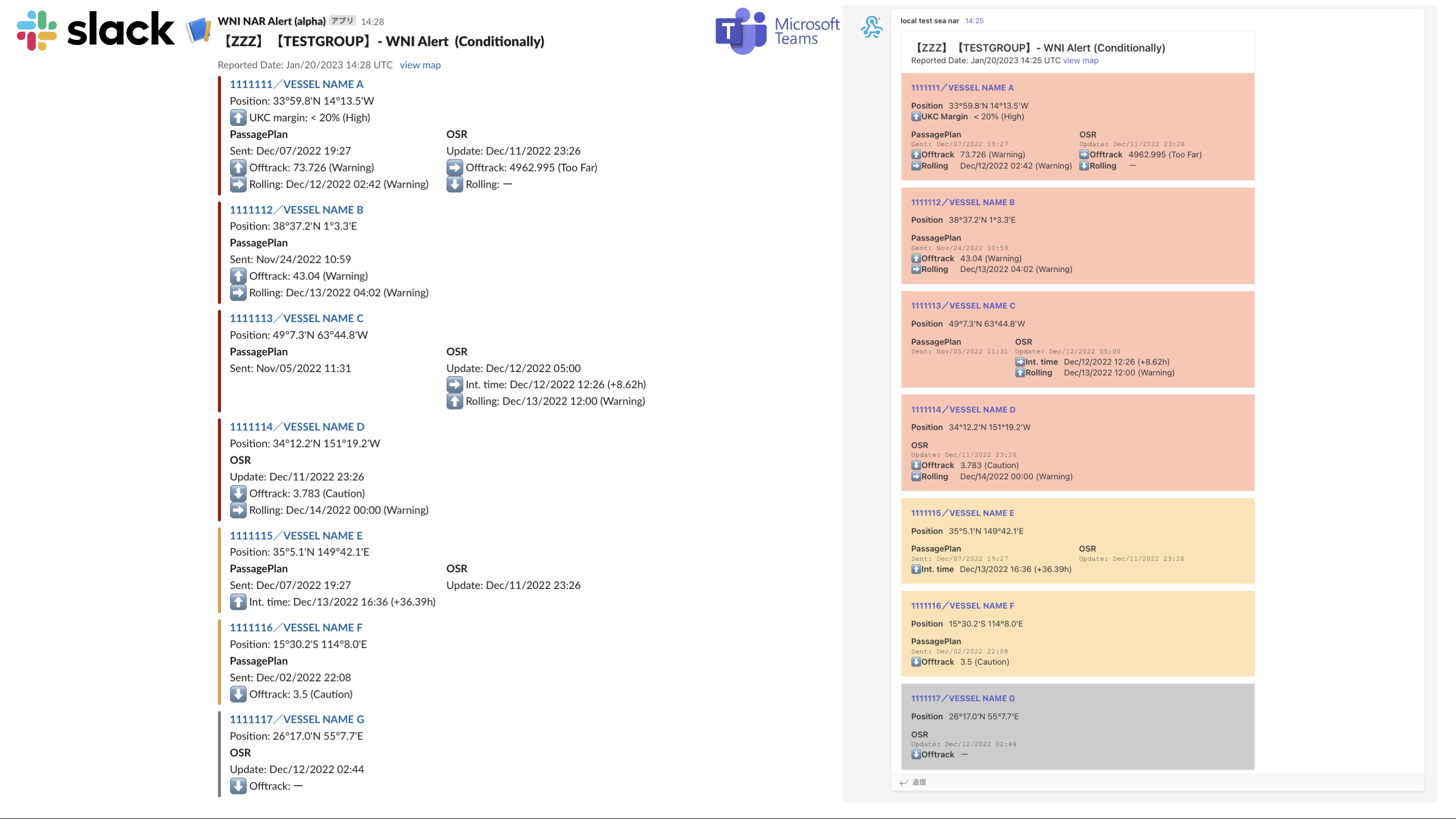
- Added guide to use Messaging Service Notifications
- Added how to export PassagePlan to CSV files in ECDIS (JAN-9201) link
2.4.0 _ January 20, 2023
- Added OSR Route risk alert to Messaging Service
- Added Microsoft Teams Webhook to Messaging Service Notifications
2.3.1 _ January 19, 2023
- Added a vessel label layer to the Layer Menu
- Improved the simulation point highlight (larger icon, brighter color)
- Changed the OSR simulation point icon color (gray ==> white)
- Added the alert type to intersection alerts
- Fixed a Cyclone layer line display bug
- Changed the vessel icon colors to white when no alert types are selected
- Moved the route layer above the Wind layer for easier clicking
- Removed unnecessary search bars from the Layer Menu (Grounding, Other)
2.3.0 _ January 13, 2023
- Removed zoom vessel-select zoom function
- Changed the behavior when no alert types are selected (All vessels displayed, but gray)
- Increaed the transparency of the Ocean and Coastal layers
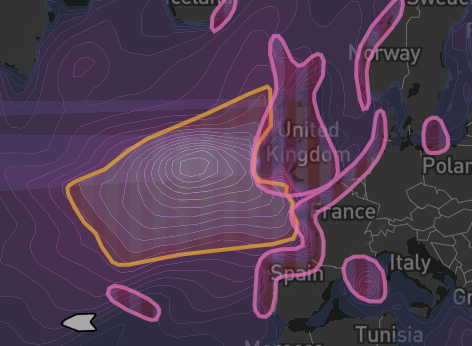
- Changed the Ocean Storm layer color from green to orange (See image below)
- Changed the vessel icons size and color
- Improved timing of not getting alert detail data
- Added a sky background to the Globe projection mode
- Fixed a NAVAREAs tooltip bug
- Fixed Ocean and Coastal layers not updating on global time change
- Fixed not display draft value of OSR Route bug
- Fixed some other minor bugs
Orange Ocean Storm and Pink Coastal Storm layers:
2.2.0 _ December 22, 2022
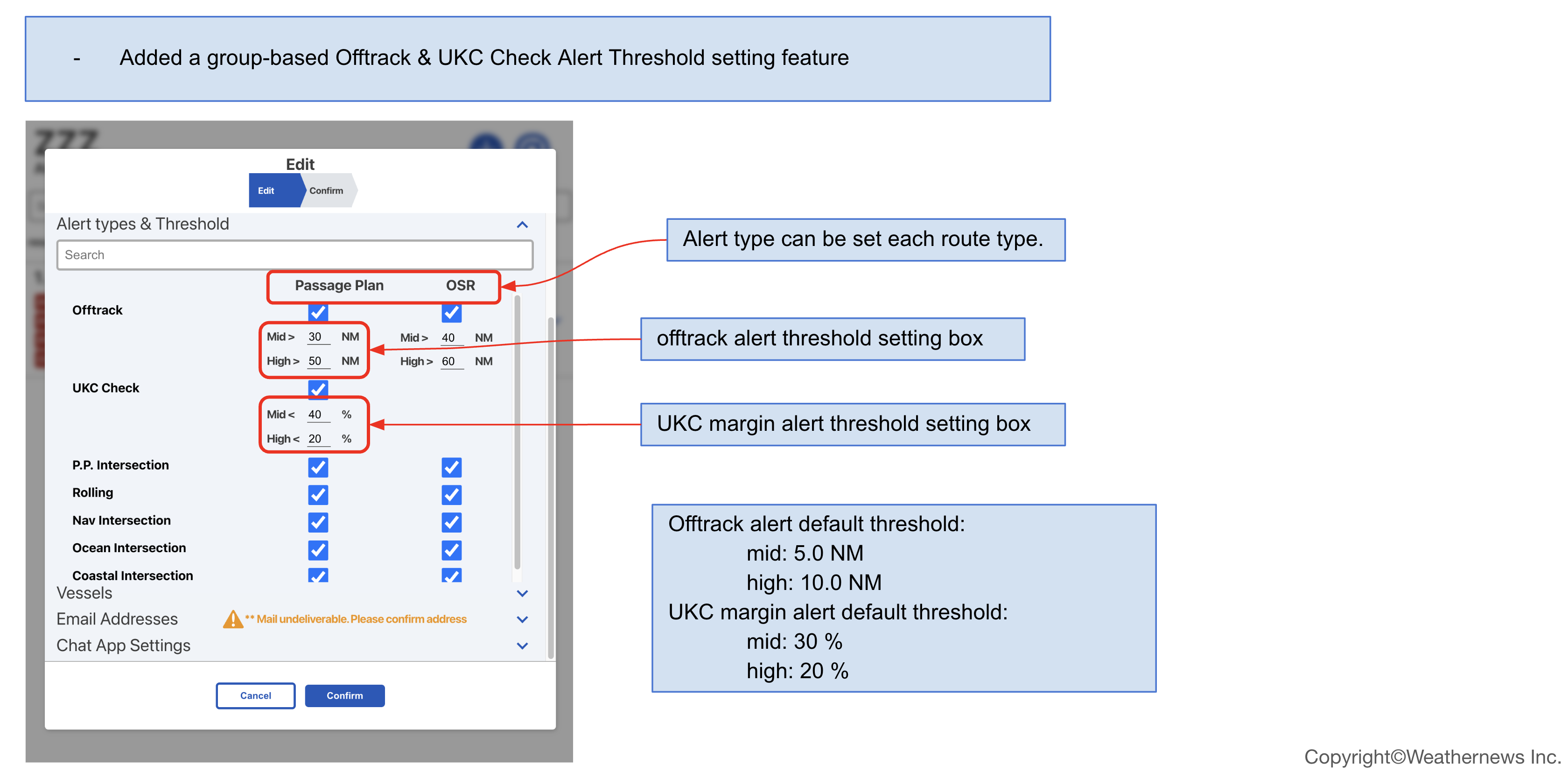
- Added a group-based Offtrack & UKC Check Alert Threshold setting feature
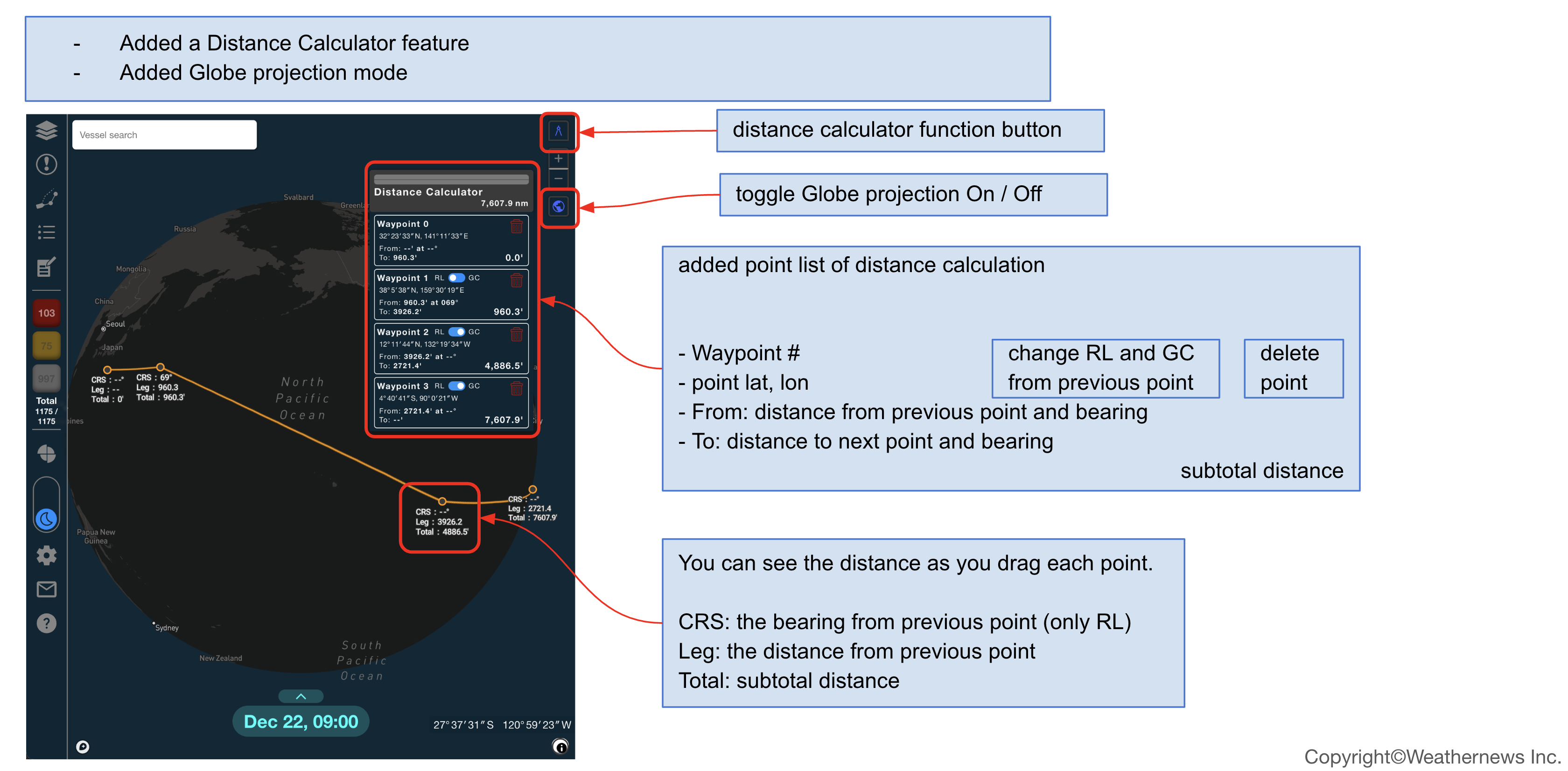
- Added a Distance Calculator feature
- Added Globe projection mode
2.1.1 _ December 12, 2022
- Fixed a bug that not updated Passageplan update status
2.1.0 _ December 1, 2022
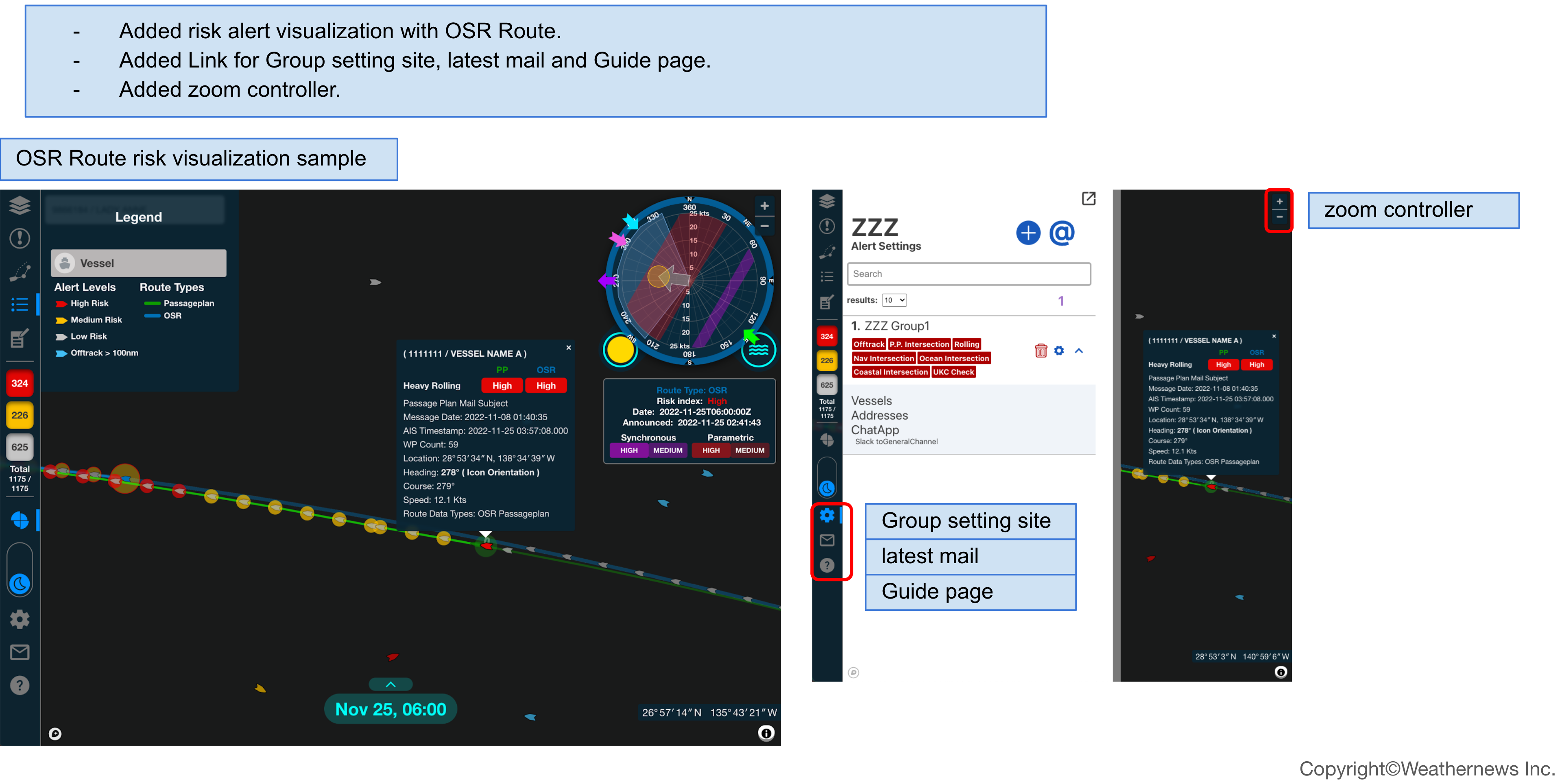
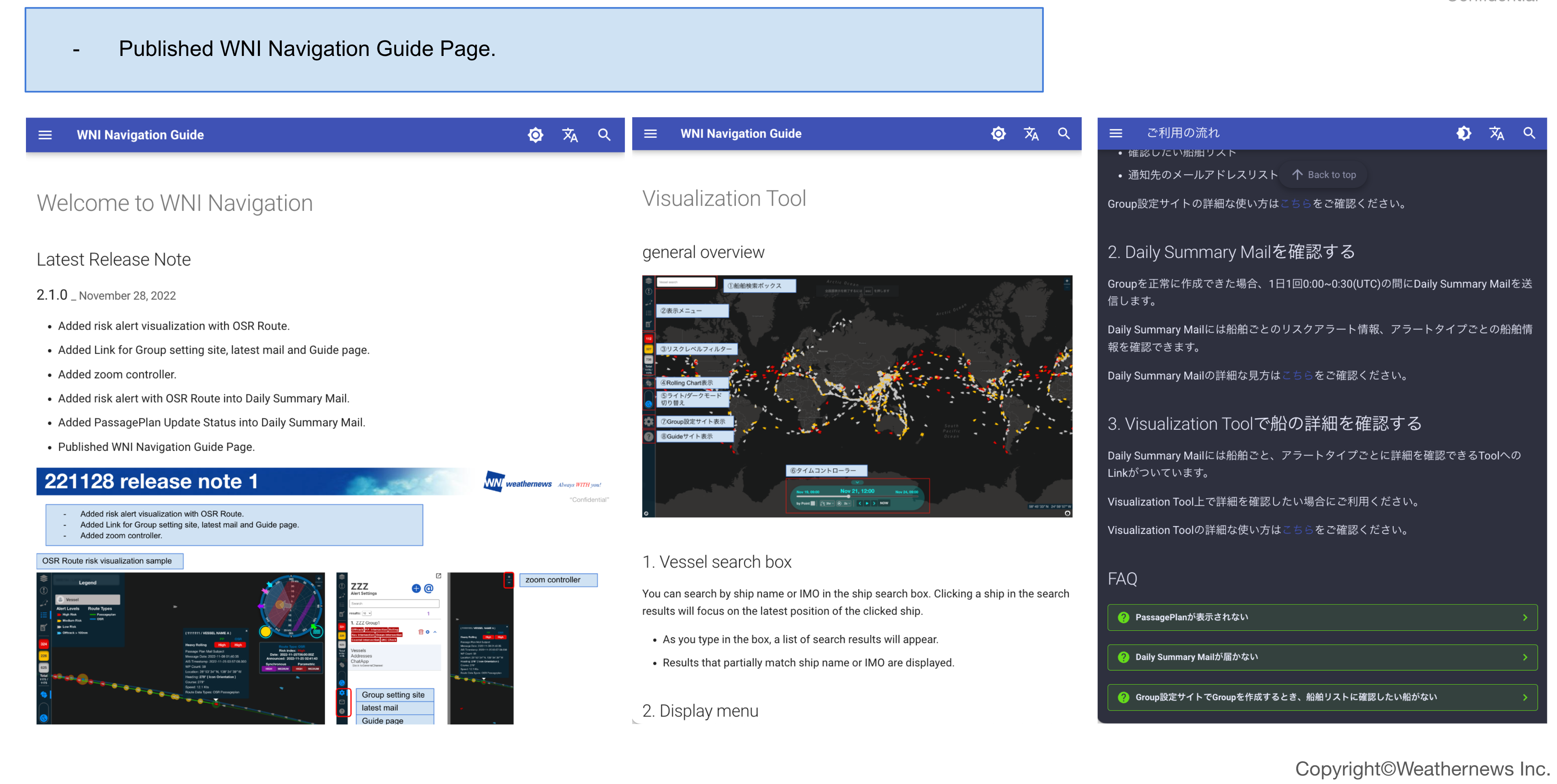
- Added risk alert visualization with OSR Route
- Added Link for Group setting site, latest mail and Guide page
- Added zoom controller
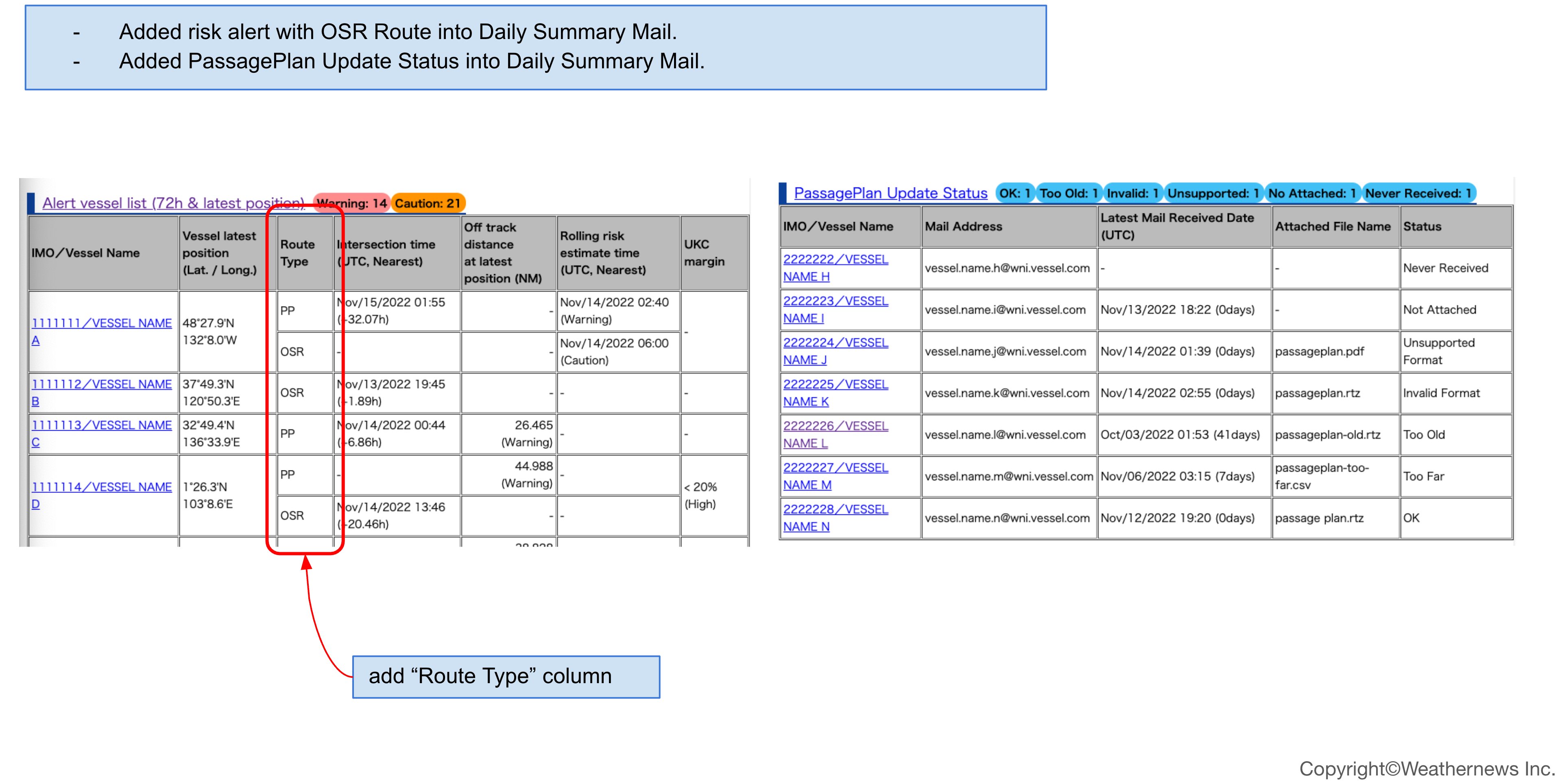
- Added risk alert with OSR Route into Daily Summary Mail
- Added PassagePlan Update Status into Daily Summary Mail
- Published WNI Navigation Guide Page
2.0.2 _ November 7, 2022
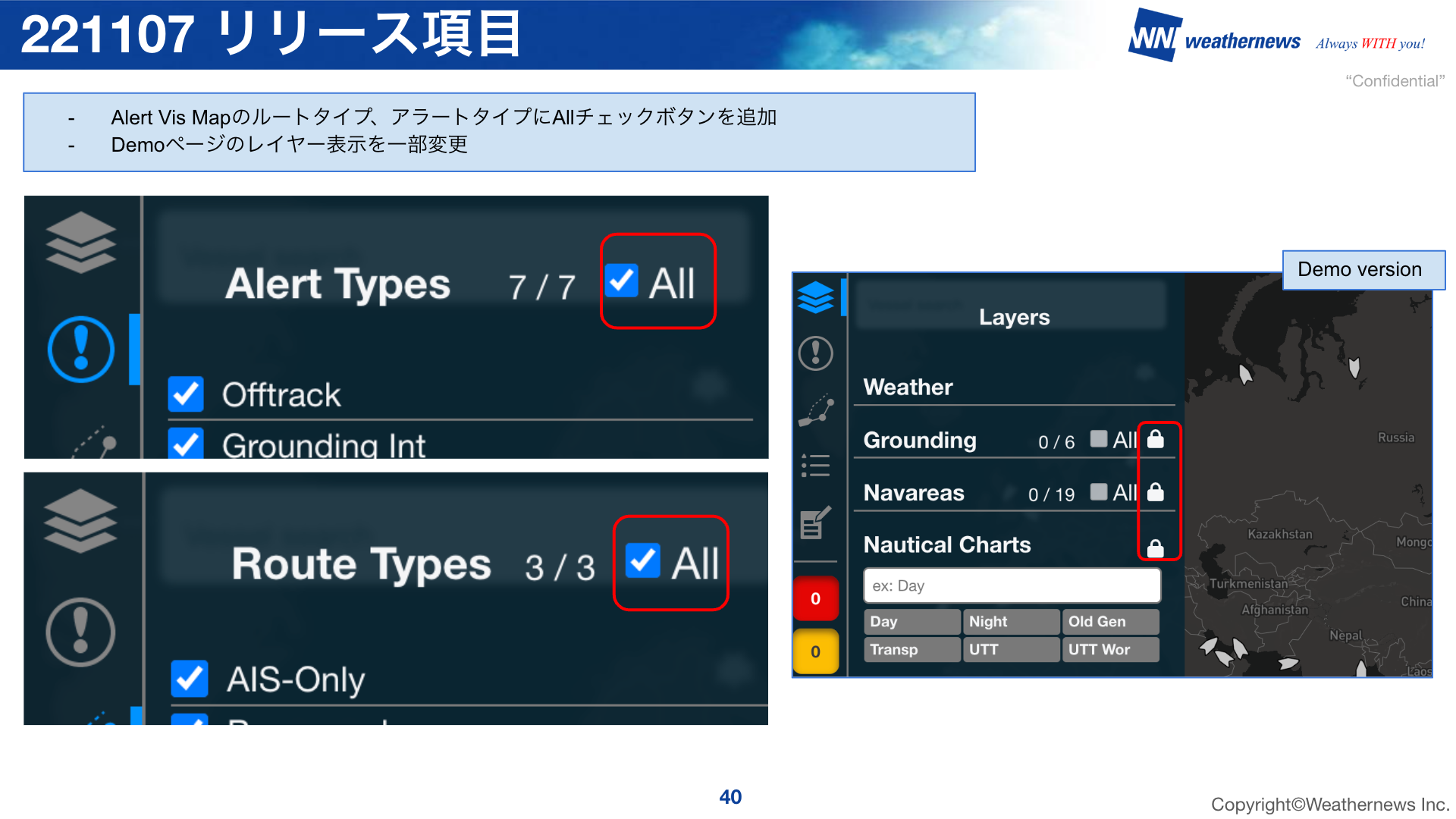
- Added an "All" checkbox to Alert types and Route types
- Updated the available layers in the Demo version
2.0.1 _ November 1, 2022
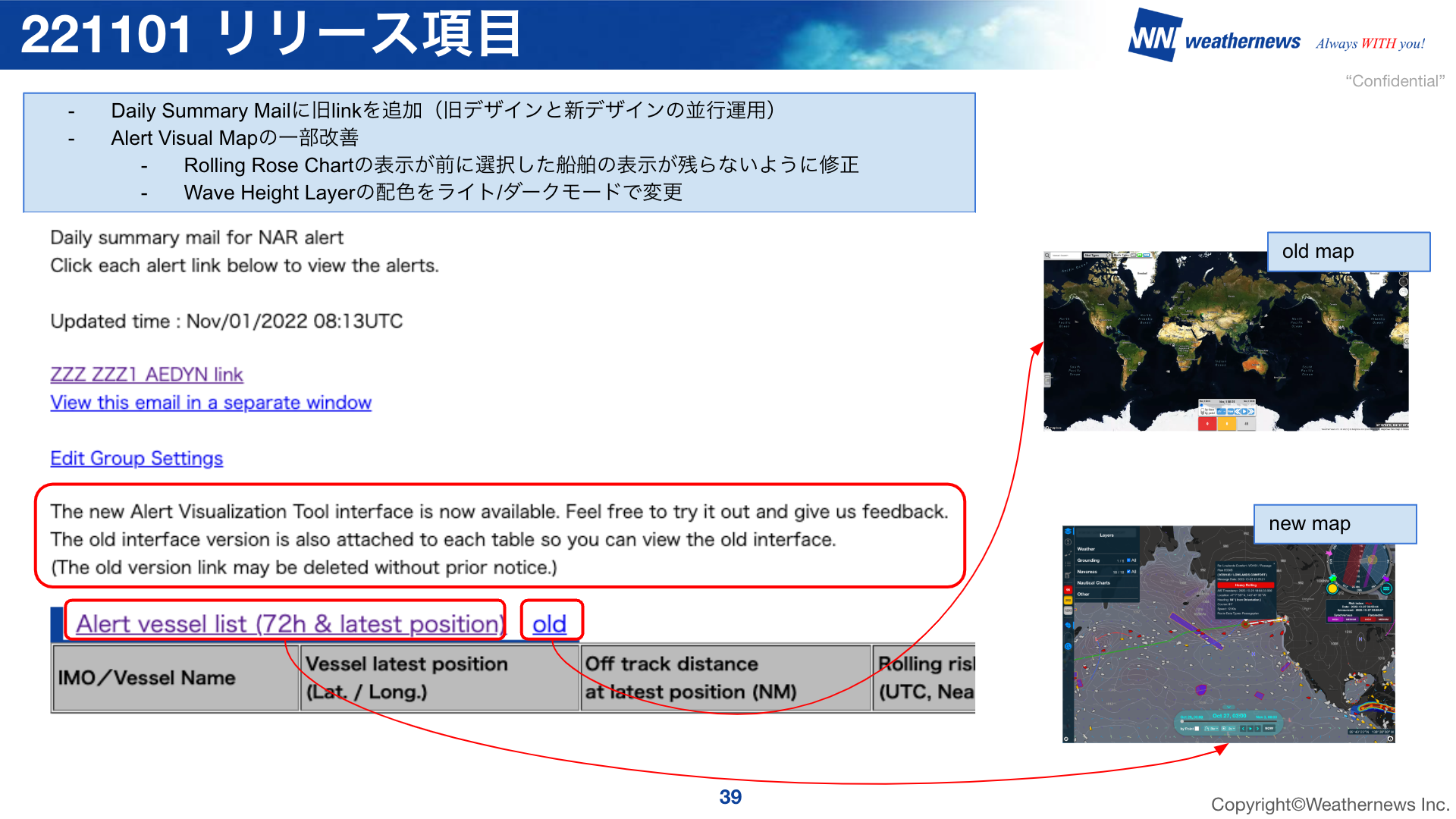
- Added old link to Daily Summary Mail (old design and new design are operated in parallel)
- Some improvements to Alert Visual Tool
- Fixed Rolling Rose Chart display so that the previously selected vessel's display does not remain
- Changed color scheme of Wave Height Layer in light/dark mode
2.0.0 _ October 31, 2022
- The alert visualization tool was redesigned